> For the complete documentation index, see [llms.txt](https://ajuda.espiaonfe.com.br/llms.txt). Markdown versions of documentation pages are available by appending `.md` to page URLs; this page is available as [Markdown](https://ajuda.espiaonfe.com.br/gestao/ct-e/consultas-na-sefaz/certificado-a3.md).
# Consulta com Certificado A3
Aprenda como consultar CT-e na SEFAZ com certificado digital A3, conheça os requisitos e configure a consulta pelo Cloud Monitor do Espião Cloud.
## Como consultar CT-e com certificado A3
O **certificado digital A3 permite consultar Conhecimentos de Transporte Eletrônicos (CT-e) na SEFAZ utilizando um certificado armazenado em token ou cartão criptográfico conectado ao computador**. Nesta página você aprenderá como consultar CT-e com certificado A3, quais são os requisitos e como configurar o Cloud Monitor do Espião Cloud para iniciar as consultas.
### 🤔 Como consultar CT-e com certificado do tipo A3?
Como o certificado A3 depende de um token ou cartão conectado ao computador, as consultas são executadas pelo **Cloud Monitor instalado localmente**.
Para efetuar uma consulta utilizando o [certificado A3](https://blog.espiaonfe.com.br/o-que-e-certificado-digital-para-que-serve/), é necessário que o [Cloud Monitor](https://help.espiaonfe.com.br/gestao/cloud-monitor/o-que-faz) esteja instalado no computador. Acesse como [Instalar Cloud Monitor](https://help.espiaonfe.com.br/gestao/cloud-monitor/instalacao) e faça o download. Se você encontrar dificuldades durante a instalação do monitor, não hesite em contatar nosso suporte para obter a assistência adequada.
### 📃 Para consultar com A3, siga as etapas a seguir:
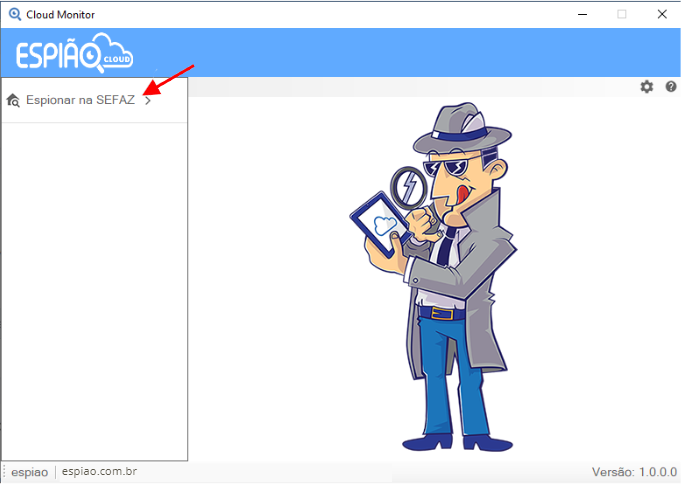
1. Abra o **Cloud Monitor** e clique em **Espionar na SEFAZ**
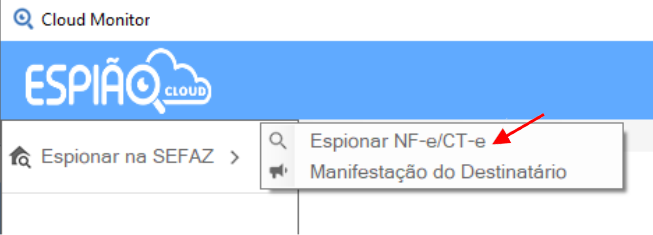
2. Selecione o **Espionar NF-e/CT-e**
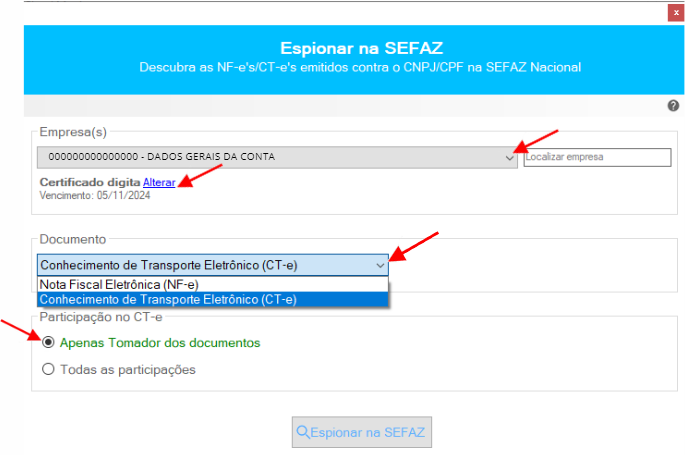
3. Escolha a empresa e, se houver mais de um certificado na máquina, opte pelo certificado desejado. Em seguida clique em **CT-e**. Nas opções **Participação no CT-e** você pode escolher para buscar **Apenas Tomador dos documentos ou Todas as participações**
4. Para concluir, é só clicar em **Espionar na SEFAZ**
---
# Agent Instructions
This documentation is published with GitBook. GitBook is the documentation platform designed so that both humans and AI agents can read, navigate, and reason over technical content effectively. Learn more at gitbook.com.
## Querying This Documentation
If you need additional information that is not directly available in this page, you can query the documentation dynamically by asking a question.
Perform an HTTP GET request on the current page URL with the `ask` query parameter, and the optional `goal` query parameter:
```
GET https://ajuda.espiaonfe.com.br/gestao/ct-e/consultas-na-sefaz/certificado-a3.md?ask=&goal=
```
`ask` is the immediate question: it should be specific, self-contained, and written in natural language.
`goal` is optional and describes the broader end goal you are ultimately trying to accomplish on behalf of the user. GitBook uses it to tailor the answer towards what is most useful for that goal.
The response will contain a direct answer to the question and relevant excerpts and sources from the documentation.
Use this mechanism when the answer is not explicitly present in the current page, you need clarification or additional context, or you want to retrieve related documentation sections.